Quickstart
Use PIP to install ConstraintHg into your Python environment:
pip install constrainthg
From there you’ll want to import the library into your Python script. This is a pretty typical method to use:
from constrainthg.hypergraph import Node, Hypergraph
import constrainthg.relations as R
Simple Demo
Note that this demo is found in demos/demo_basic.py
Let’s build a basic constraint hypergraph of the following equations, visualized on the right:
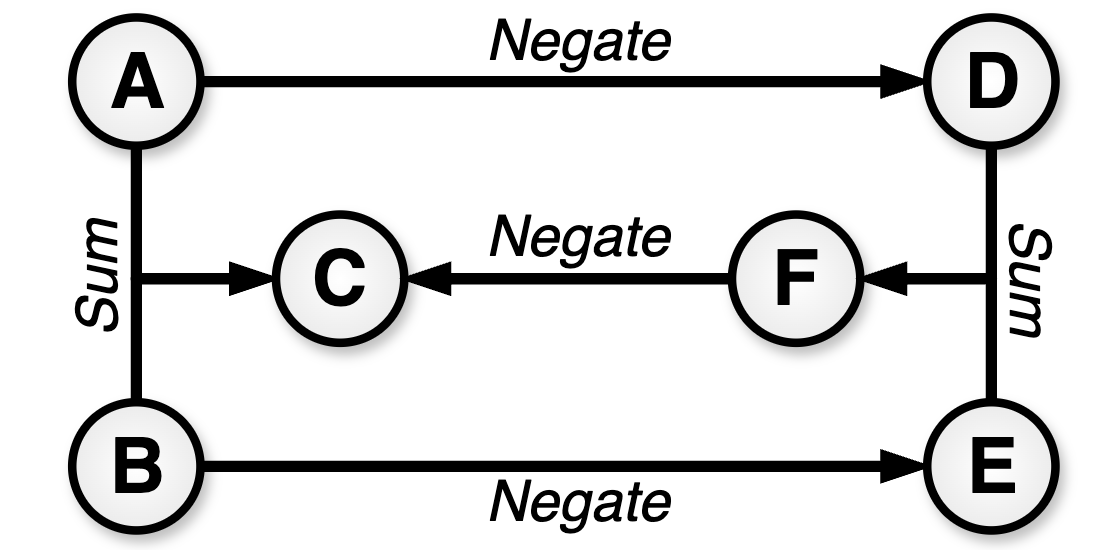
\(A + B = C\)
\(A = -D\)
\(B = -E\)
\(D + E = F\)
\(F = -C\)
First, import the classes.
from constrainthg.hypergraph import Hypergraph
import constrainthg.relations as R
A hypergraph consists of edges that map between a set of nodes to a single node. We provide the mapping by defining a constraint function (many of which are already defined in the relationships module). The two relationships defined in the governing equations are addition and negation. Using the typical syntax, we refer to the functions defined in relationships with R.<name>, in this case R.Rsum and R.Rnegate. To make the hypergraph we’ll need to compose the 5 edges (equations) given above.
hg = Hypergraph()
hg.add_edge(['A', 'B'], 'C', R.Rsum)
hg.add_edge('A', 'D', R.Rnegate)
hg.add_edge('B', 'E', R.Rnegate)
hg.add_edge(['D', 'E'], 'F', R.Rsum)
hg.add_edge('F', 'C', R.Rnegate)
We can verify that the hypergraph was made correctly by tracing all possible paths for generating C using the printPaths function.
print(hg.summary('C'))
This should give us the following output. Hyperedges are indicated with a ◯, with the last source separated from other edges with a ●.
└──C, cost=1
    ├◯─A, cost=0
    ├●─B, cost=0
    └──F, cost=3
        ├◯─D, cost=1
        │  └──A, cost=0
        └●─E, cost=1
            └──B, cost=0
Compute the value of \(C\) by picking a set of source nodes (inputs), such as \(A\) and \(B\) or \(A\) and \(E\). Set values for the inputs and the solver will automatically calulate an optimized route to simulate \(C\).
print("**Inputs A and E**")
hg.solve('C', {'A':3, 'E':-7}, to_print=True)
print("**Inputs A and B**")
hg.solve('C', {'A':3, 'B':7}, to_print=True)
The output of the above should be:
**Inputs A and E**
└──C= 10, cost=3
    └──F= -10, cost=2
        ├──D= -3, cost=1
        │  └──A= 3, cost=0
        └──E= -7, cost=0

**Inputs A and B**
└──C= 10, cost=1
    ├──A= 3, cost=0
    └──B= 7, cost=0